

It is a familiar and frustrating scenario: you have just loaded your laundry, pressed start, and walked away. An hour later, you return expecting clean clothes, only to find a digital code flashing on the display panel while your clothes sit in a pool of soapy water.
Modern appliances are incredibly smart, but they can still encounter hiccups. Before you panic and dial an expensive repair service, take a breath. That flashing code is actually your machine trying to help you. In my 15 years of diagnosing appliances, I have found that the vast majority of Samsung washing machine problems can be resolved in under ten minutes with basic tools.
This comprehensive guide will decode the mystery behind Samsung washer error codes, walk you through proven fixes, and help you get your laundry routine back on track.
What Are Samsung Washer Error Codes?
An error code is essentially your washing machine’s internal language. When the main control board detects that a component is not operating within its normal parameters—whether that is a slow-draining pump, a door that will not latch, or an imbalanced drum—it pauses the cycle to prevent catastrophic damage.
Instead of leaving you to guess what went wrong, the machine outputs Samsung washer diagnostic codes on the digital display. Older models might use a combination of flashing LED lights, but modern units rely on a two-character alphanumeric system (like 4C or UE). By translating these codes, you can instantly pinpoint which system needs your attention.
Why Samsung Washers Display Error Codes
You might wonder why the machine simply stops instead of trying to push through the cycle. The onboard computer triggers these codes for three primary reasons:
-
Safety: To prevent electrical shorts, fires, or massive flooding in your home.
-
Machine Preservation: Running a washer with an imbalanced drum or a dry pump can destroy the motor or bearings. Halting the cycle saves the machine from permanent damage.
-
User Guidance: Providing a specific code acts as a built-in Samsung washer repair guide, directing you (or your technician) straight to the faulty component, saving hours of diagnostic guesswork.

Complete Samsung Washer Error Codes Table
For quick reference, here is a lookup table for the most frequently encountered codes.
| Error Code | Primary Meaning | Quick Action / Initial Check |
| 1C / 1E | Water Level Sensor Issue | Check wiring to the water level sensor. |
| 3C / 3E | Motor Defect | Pause cycle, reduce load size, restart. |
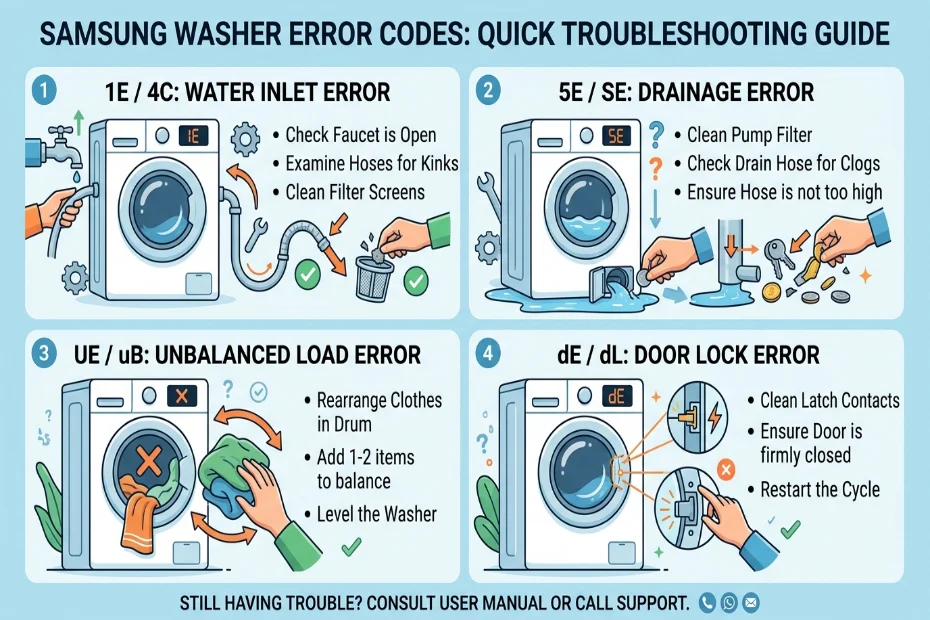
| 4C / 4E | Water Supply Error | Check water valves and inlet hoses for kinks. |
| 5C / 5E | Drainage Error | Clean the debris filter and check the drain hose. |
| 9C / 9E | Voltage Error | Check your home’s circuit breaker and outlet. |
| DC / dE | Door / Unbalanced | Close door firmly; redistribute the laundry load. |
| LC / LE | Water Leak Detected | Inspect door seal, hoses, and detergent drawer. |
| OC / OE | Water Overflow | Reduce detergent; check water inlet valve. |
| UE / Ub | Unbalanced Load | Pause, untangle clothes, and restart the spin cycle. |
| SE / 5E | Sensor / Drain Issue | Often a misread 5E. Clean the drain pump filter. |
Note: Depending on the age and model of your machine, it may display an “E” (Error) instead of a “C” (Code). For example, 4C and 4E indicate the exact same water supply issue.
Most Common Samsung Washer Error Codes Explained
Let’s dive into the specifics of the most common codes you will encounter, what causes them, and exactly how to fix them.
4C (Water Supply Issue)
The 4C code triggers when the washer fails to fill with water within a specific timeframe.
-
The Fix: First, verify that the hot and cold water supply valves behind the washer are fully open. Next, inspect the inlet hoses for any sharp bends or kinks. If the hoses are clear, turn off the water, unscrew the hoses from the back of the washer, and check the small mesh screens inside the inlet valves. Hard water scale or debris often clogs these screens. Clean them gently with an old toothbrush.
5C (Drainage Issue)
A 5C error means water is not draining from the drum fast enough.
-
The Fix: The culprit is almost always a clogged pump filter (also known as the debris filter), located behind a small door on the bottom front of front-load washers. Place a towel on the floor, pull the emergency drain hose to empty the water, and then unscrew the filter. Remove the coins, hairpins, and lint blocking the impeller, wash the filter under the sink, and replace it.
DC (Door Open / Unbalanced Load)
The DC code indicates that the machine cannot operate because the door is open or the load is violently throwing the drum off-center.
-
The Fix: Push firmly on the door to ensure the latch clicks. If it is closed, the load is likely out of balance. Heavy items like bath mats or thick blankets can clump on one side. Pause the cycle, manually untangle and distribute the weight evenly, and restart.
UE (Unbalanced Error)
Similar to DC, the UE code specifically calls out a severe imbalance during the high-speed spin cycle.
-
The Fix: Stop the machine and redistribute the load. If you are washing a single heavy item (like one large pillow), add a few towels to balance the weight. Additionally, place a bubble level on top of your washer. If the machine itself is rocking, adjust the leveling legs at the bottom of the unit until it sits perfectly flat on the floor.
OC (Water Overflow)
OC (or OE) means the machine has detected too much water inside the drum.
-
The Fix: This is frequently caused by using standard detergent instead of High-Efficiency (HE) detergent, or simply using too much of it. The excessive suds trick the water level sensor. Run a rinse-and-spin cycle to clear the suds. If the drum is physically overfilling with clear water even when the machine is off, the water inlet valve is stuck open and must be replaced.
LC / LE (Water Leak)
An LC or LE code triggers when the moisture sensor in the base of the unit detects water where it shouldn’t be.
-
The Fix: Check all external connections first: the hot and cold water hoses, and the drain hose. Next, inspect the rubber door boot (bellows) for rips or trapped hair that might be breaking the watertight seal. Finally, ensure the detergent drawer is closed tightly and not clogged with hardened soap powder.
3E (Motor Defect)
The 3E error points to an issue with the motor hall sensor or the motor itself, meaning the control board isn’t detecting the drum’s rotation properly.
-
The Fix: Sometimes this is a temporary glitch caused by an overloaded drum straining the motor. Remove half the clothes, unplug the machine for five minutes to reset the computer, and try again. If the code persists, the motor or the control board likely requires professional testing.
ND (No Drain)
Common on older top-loading models, ND is the exact equivalent of the 5C code.
-
The Fix: Check the drain hose to ensure it isn’t crushed against the wall or pushed too far down into the standpipe (which creates a vacuum effect). Clear the pump filter.
SE (Sensor Error)
Often, a digital display with a failing LED segment will make a 5E (drain error) look like an SE.
-
The Fix: Treat this exactly as a drainage issue first. Clean the pump filter and check the drain hose. If the code remains and the machine is perfectly empty of water, the main control board may have a faulty sensor relay.
Pro Tip: If you encounter a rare code not listed in this guide, or you have an older model with a non-standard display, I highly recommend using a dedicated Samsung Error Code Lookup Tool. It is the fastest way to translate obscure codes and find exactly what component is failing.
Step-by-Step Samsung Washer Troubleshooting Guide
When your machine acts up, follow this logical progression before buying replacement parts:
-
Perform a Hard Reset: Computers control modern washers, and computers sometimes need a reboot. Unplug the washing machine from the wall outlet completely (do not just press the power button). Wait a full 5 to 10 minutes to let the electrical charge dissipate from the board. Plug it back in and restart the cycle.
-
Check the Basics: Is the water turned on? Is the door audibly clicking shut? Is the drain hose kinked? Eliminate the obvious external factors first.
-
Run a Diagnostic Cycle: Many Samsung washers have a built-in “Smart Care” or diagnostic mode. Refer to your user manual to activate it. You can sync this with the Samsung Smart Washer app on your phone to get a direct readout of the issue.
-
Clean the Filters: Over 60% of all Samsung washing machine error codes originate from blockages. Clean the inlet mesh filters at the back and the debris pump filter at the front.
-
Level the Machine: An unlevel washer will constantly throw UE and DC codes, and the excessive vibration will eventually tear the shocks and drum bearings.
When to Call a Professional Technician
While DIY Samsung washer troubleshooting is highly effective, some situations require a licensed professional:
-
Persistent Electrical Codes: If codes like 3E (Motor) or 9C/9E (Voltage) persist after a hard reset, do not attempt to dismantle the motor or control board unless you are trained in appliance electronics.
-
Internal Leaks: If the LE code is flashing but all external hoses and door seals are dry, the leak is internal (often a cracked outer tub or a ruptured internal hose). Opening the cabinet to fix this is complex.
-
Grinding Noises: If a code is accompanied by a noise that sounds like a jet engine taking off during the spin cycle, the rear drum bearing has failed. This is a major teardown repair that usually warrants a technician’s expertise.
Tips to Prevent Future Samsung Washer Errors
The best repair is the one you never have to make. Implement these maintenance habits to keep your washer running smoothly:
-
Empty Pockets Religiously: Coins, nails, and screws are the number one enemy of the drain pump. Check every pocket before loading.
-
Use HE Detergent Sparingly: Modern front-loaders use very little water. Two tablespoons of HE detergent is usually plenty. Excess suds destroy sensors and cause OC errors.
-
Leave the Door Ajar: After your laundry is done, leave the door open for an hour. This allows the drum and rubber seal to dry, preventing mold growth and preserving the integrity of the door seal (preventing LE leaks).
-
Monthly Filter Cleaning: Make it a habit to drain and clear the bottom debris filter on the first of every month.
-
Run a Self-Clean Cycle: Use the machine’s “Self Clean” setting (or run a hot water cycle with washer cleaner tablets) every 40 washes to remove internal scale and detergent buildup.
Frequently Asked Questions (FAQ)
Are Samsung washer error codes the same for all models?
Mostly, yes. Samsung has standardized its diagnostic codes across its top-load and front-load models over the last decade. However, older units might use “E” instead of “C” (e.g., 4E vs 4C), and some budget models use flashing lights instead of a digital screen.
How do I clear an error code on my Samsung washer?
First, fix the underlying issue. Once resolved, pressing the “Start/Pause” button will often clear the code and resume the cycle. If the code locks the screen, power the machine down, unplug it for 5 minutes, and plug it back in to reset the board.
Why does my washer say UE even when it is empty?
If a UE (Unbalanced) code triggers with an empty drum, the suspension rods (in top loaders) or shock absorbers (in front loaders) have likely worn out and need replacement, or the machine is sitting on an uneven floor.
Conclusion
Encountering Samsung washer error codes does not have to ruin your week. By understanding what these diagnostic signals mean, you transform a stressful breakdown into a manageable fix. Remember that most issues—like the dreaded 5C or 4C—are simple airflow or water flow blockages that you can clear with zero mechanical experience.
Keep this guide handy, maintain your machine with regular filter cleanings, and always respect the digital warnings your appliance gives you. If you ever run into a code that stumps you, don’t guess—head over to the Samsung Error Code Lookup Tool to instantly diagnose the problem and keep your laundry routine flowing smoothly.